 Story Circle
What can you do in the Story Circle book writing app?
Story Circle is a free book writing app for Android where you write a book together instead of alone. Write the next chapter of someone else’s book, set up your own with its own rules, or let readers pick their path through a branching story. Readers get reading lists, notes, comments, and EPUB or PDF export.
Last updated:
Everything below is in the app today; what isn’t available yet is listed separately at the end. For the rules behind these features, see how Story Circle works, step by step. The screenshots on this page come from the Turkish interface; for the full tour, see the Story Circle screenshots.
Is Story Circle free, and which devices does it run on?
Story Circle is free to download and use. It runs on Android today, and the interface is available in English and Turkish.
The app is in closed testing on Google Play, with the public release planned for November 1, 2026. There is no iOS version yet, and books are written on your phone rather than on a computer. You can pick the interface language in settings or let it follow your device. The app shows no ads.
Inside the app there is a unit called Story Coin (SC). It grows as you write and read, and SC can’t be bought. Setting up a book, extending it, exporting it and appreciating a chapter cost SC; the right to write a chapter can never be bought with it.
On Story Circle, people write the chapters. AI does not write or review them today: the automatic content review before publishing uses a word list.
What can you do as a writer?
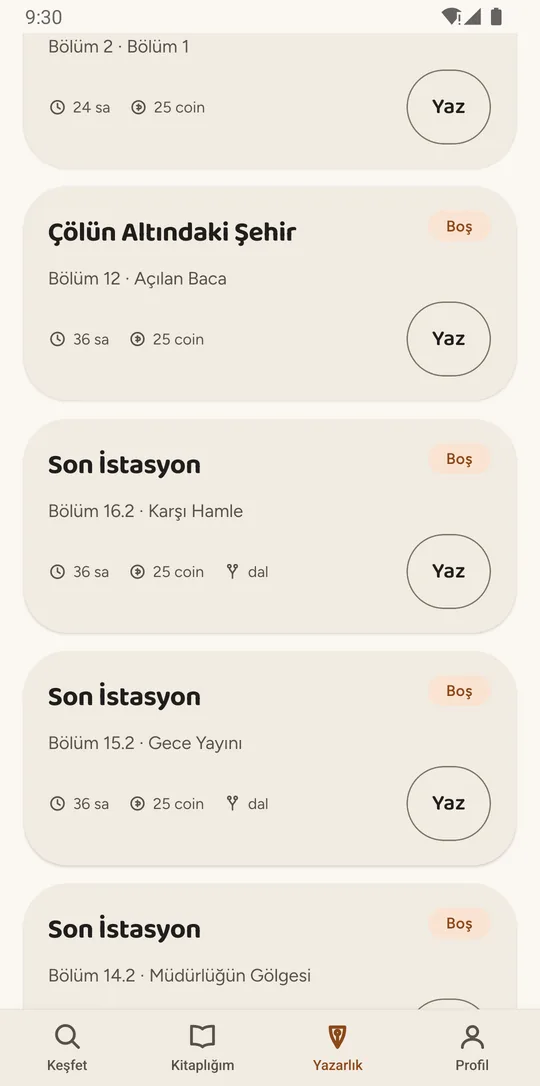
You don’t need a book of your own to write. Be the first to start writing an open chapter in someone else’s book and it is yours to write within the book’s writing time; once you submit and it passes content review, it is published.
You keep the copyright in what you write; Story Circle only gets a non-exclusive license to publish, list and promote it on the platform. Writing fan fiction? Choose “fan fiction” when you set up the book and name the source work — the guide what is fan fiction covers the basics.
Open chapters list
The Writing tab gathers every open chapter in every book you can write in: which book, which chapter, and how much writing time you get if you start. If there are chapters you need to read first, the card says so.
Notify me when it opens up
If someone else is writing the chapter you wanted, leave a request and you get a notification if it opens again.
Editor with automatic drafts
Time left, a character counter and the last save time are always on screen. Your draft saves to the server as you type, and to your phone if the connection drops; if your writing time is up, it stays in My drafts.
The story at your side
The previous chapter, the book’s note and rules, the character guide and the notes you took while reading open without leaving the editor, including any required opening line or words the book bans.
Submission and review result
Your chapter goes through automatic content review before it is published, and you can follow it on screen. If it is flagged, you see why and can correct it, withdraw it, or appeal for human review.
My drafts and contributions
Every unfinished draft sits in one place. Contributions lists the books you have written in and whether each is being written, finished or paused.
Revisions
A published chapter does not change directly, but it can be revised. You can open a revision for your own chapter and, if the book allows it, propose a change to someone else’s with a reason. The book owner decides.
Character proposals
If the story needs a new character, propose one for the character guide. Until it is approved, only you and the book owner see it.
Author chat
A coordination board for the people writing a book — for “heads up, I’m writing this character out in my chapter.” Readers don’t see it; only the book’s writers do.
Setting up your own book
A step-by-step setup asks for the title and genre, whether it is original or fan fiction, the age rating, the premise and rules, the structure, who can write, the first chapter and the characters. Written in order or branching, chapter length, writing time: you choose.
How do writing together and branching work?
Each chapter of a book can be written by a different person. In a branching book, two continuations can be written under a chapter and readers choose their own path at every fork.
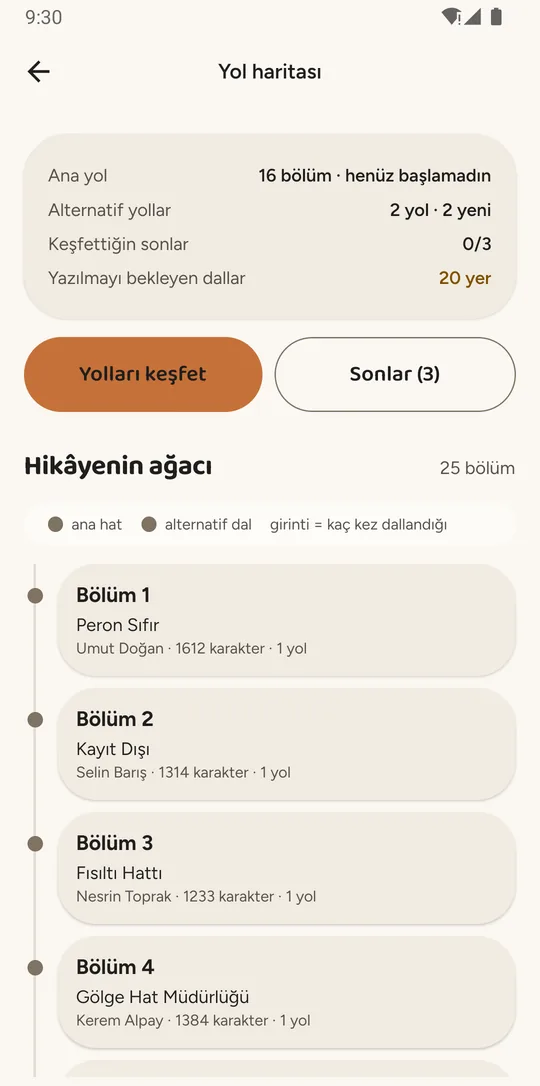
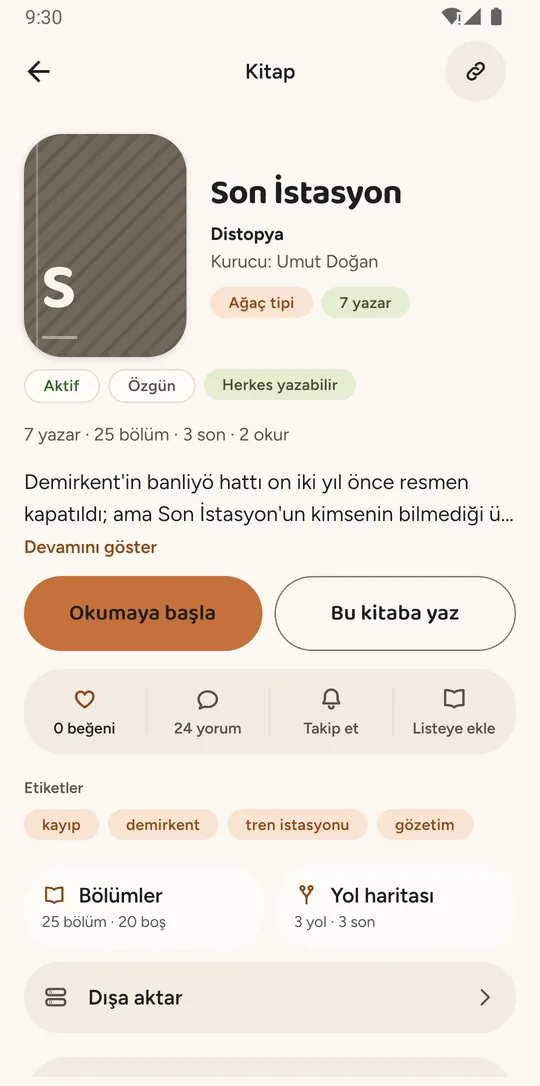
Whoever sets up the book decides up front whether it is written in order or branches. In a branching book the road map shows the shape of the story: the main path, alternative paths, how many endings there are, and which continuations are still waiting to be written. For readers that is interactive fiction; for writers it is a map of open chapters.
For keeping a book consistent across many authors, see the guide to collaborative writing.
What can you do as a reader, without writing a word?
Story Circle is also a reading app: you can read, follow, take notes and comment without ever writing a chapter.
Most books are still being written, so the chapter you read today may get its next part from someone else tomorrow. Follow a book and you hear about each new chapter without checking back.
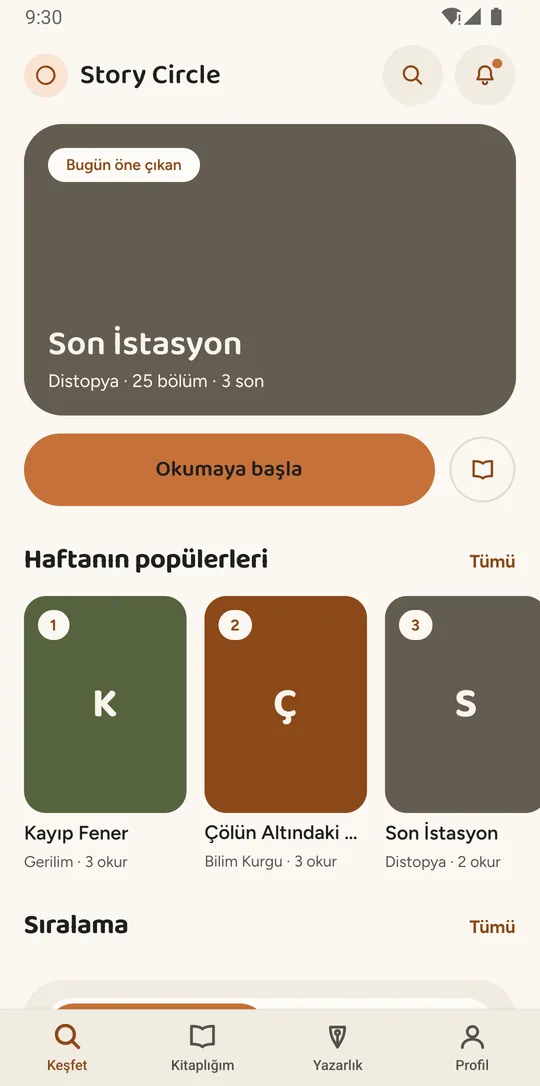
Discover
Today’s featured book, the week’s popular titles, rankings, categories and shelves in one place. Search by title, author or tag, or pick a short read you can finish in one sitting.
Pick up where you left off
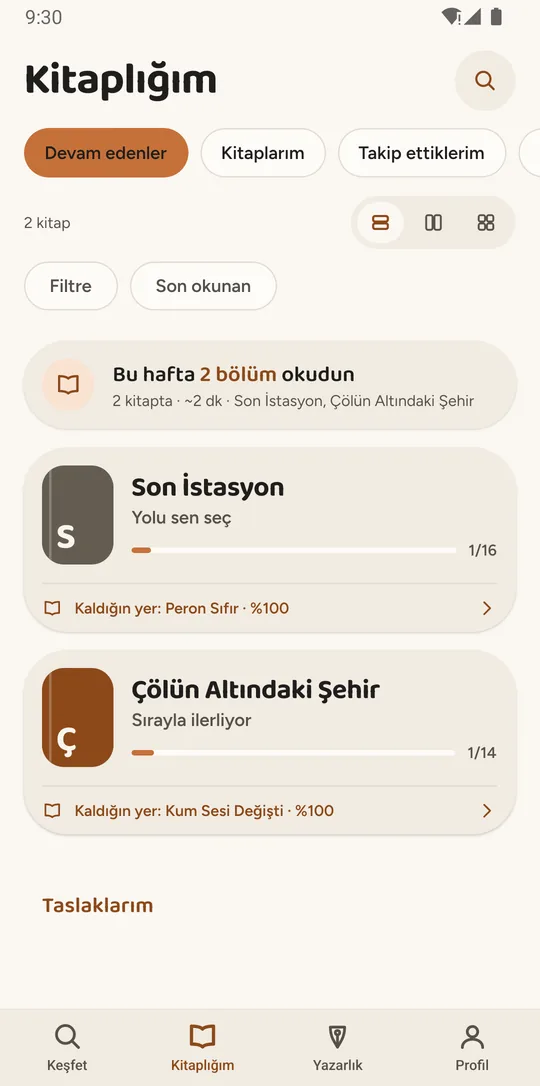
Every book in your library remembers the chapter and the spot you stopped at. In a branching book it remembers your path, so you come back to your own version of the story.
Reading lists
Make your own lists and add or remove books, so a “read it later” book is never lost.
Reading view
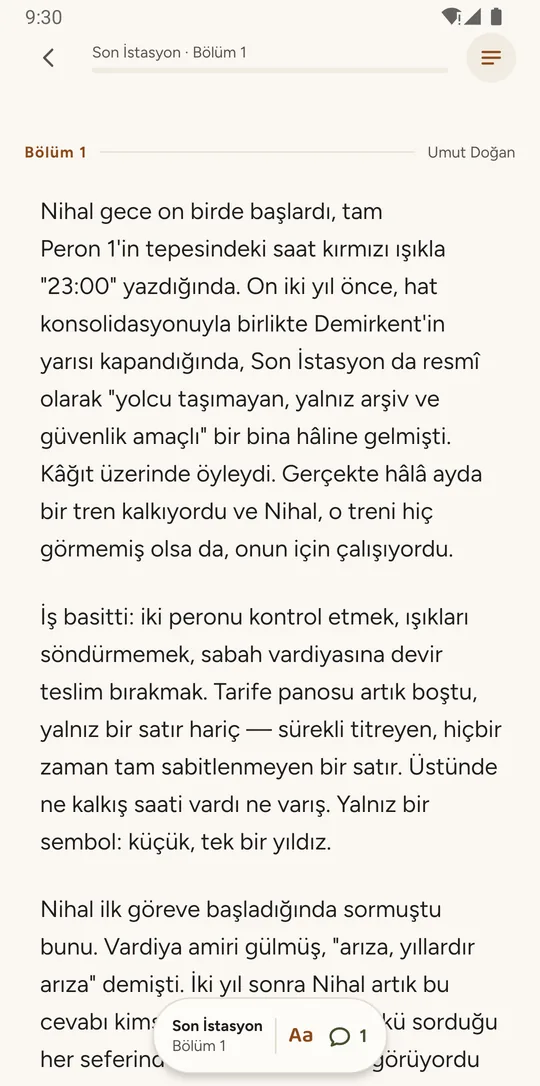
Adjust text size and line spacing, and follow your progress in the bar at the top. The name of the person who wrote each chapter sits at its start.
Notes and quotes
Press and hold a paragraph to take a note or save it as a quote; they all live in My notes. You can also see how many readers marked the same paragraph.
Comments and likes
Comment at the end of every chapter, reply to comments and like them. Comments marked as spoilers stay hidden until you open them. You can like a chapter and a book separately.
Appreciation
Appreciate a chapter you loved by spending SC. Each reader can appreciate a chapter once; the SC goes to no one — appreciation is a lasting mark left for the writer.
Road map and endings
In a branching book you see the whole story as a map: the main path, alternative paths, how many endings you have found, and how many continuations are still waiting to be written. The Endings screen lists every ending.
Follow and weekly digest
Follow a book to hear when a new chapter is published or the book is finished, with notification settings per book. Once a week, a digest sums up what happened in the books you follow.
What can the person who set up a book do?
A book owner protects the frame of the story but can never rewrite anyone’s chapter.
The owner decides who can write, looks after the character guide, and decides whether a chapter that breaks the book’s rules stays. The limit is deliberate: a chapter’s text always belongs to the person who wrote it.
Participants and requests
Open the book to everyone or make writing need approval. With approval on, requests collect in the Owner panel; accept them, turn them down, or remove someone from the book if needed.
Pre-publication review
If you want, you see chapters that passed content review before they go live. It is off by default and can never stall the book: if you don’t decide within 24 hours, the chapter publishes on its own.
Revision decisions
Approve revisions to published chapters, or turn them down with a reason. You can never edit the text yourself; writers stay the owners of their words.
Character guide
Add and edit characters, and approve or turn down characters other writers propose. Only approved characters appear in the guide.
Removing a chapter
Remove a chapter that breaks the book’s published rules, as long as nothing has been written under it yet, by citing the rule and giving a reason. The chapter opens for writing again and its writer is told why.
Announcements and activity log
Post announcements to the book’s writers. Removals, request decisions, pausing and setting changes are logged with who did what, when and why.
Minimum author level
Require a minimum author level to write in your book, with a separate, higher bar for the last chapter if you like. It is off by default, because a gate also keeps new writers out.
Extend the book
If the story doesn’t want to end at the target chapter count, raise the target by spending SC.
Pause or finish
Pause the book for a while, or close it to new writing and finish it. In a paused book, nobody can start writing and the writing time of chapters in progress is frozen.
Can you export a book to EPUB or PDF?
Yes: you can export a book as an EPUB or PDF file, and exporting costs Story Coin (SC).
You choose which chapters go in and where writer names appear. A branching book doesn’t fit in one file, so the file is one path — the path to the ending you pick, or the main path. The start of the file says which path it is and how many endings the book has, so one branch is never passed off as the whole book.
You are charged only after the file is created, so if something goes wrong you keep your SC. Word (DOCX) and plain text are not offered, and printed books are not available yet.
Author credits in an exported file are a copyright rule, not a style choice: with credits turned off, no writer’s name appears anywhere in the file.
Levels, rewards, notifications and safety: what’s there for everyone?
Writers and readers alike get levels, badges, a daily reward, one place for notifications, and tools to report and block.
Writing progress counts only in public books. When a book is finished, everyone who wrote in it receives SC for each chapter they wrote, and a breakdown shows who wrote how much.
Export to EPUB and PDF
Download a book as a file for your e-reader or printer. In a branching book the file is one path — the path to the ending you choose, or the main path — and the file says which one it is.
Author credits
Choose where writer names appear in an exported file: at the start of each chapter, together at the end, both, or nowhere. A draft only goes into its own writer’s file.
Levels and badges
Your author level comes from the chapters you publish, the likes your contributions get, and the books you helped finish. Some badges measure output, others behavior: finishing a chapter in time, picking up a chapter someone left and finishing it, writing an ending.
Daily reward
Collect a daily SC reward each day you open the app; seven days in a row earns a bonus. A new reward opens at midnight.
Story Coin (SC)
An in-app unit that grows as you write and read. SC can’t be bought. Setting up a book, extending it, exporting it and appreciating a chapter cost SC. The right to write a chapter can never be bought with SC.
Sharing and invites
Share a book by link, or invite someone by username. An invite is a heads-up, not a pass: in a book that needs approval, the invited person still sends a request.
Notifications
New chapters, your writing time running low, review and appeal results, revision decisions, replies to your comments and request decisions all arrive in one place.
Reporting, blocking and age ratings
Report a chapter, comment, book or user; reports go to platform moderators. Block someone and their content disappears for you, and yours for them. Every book has an age rating: Everyone, 13+, 16+ or 18+.
Account, language and appearance
Email verification, password reset, Google sign-in, active sessions and account deletion are under your profile. Choose English or Turkish, and a light, dark or system appearance.
Which Story Circle features aren’t available yet?
Teams, book clubs, school groups, events and contests, the AI writing assistant, books that advance by vote, and printed books can’t be used in the app today.
They will appear on this page when they are ready. The table below shows where things stand today.
| Feature | Status |
|---|---|
| Writing chapters in other people’s books | Available |
| Setting up your own book (in order or branching) | Available |
| Reading, picking up where you left off, reading lists | Available |
| Notes, quotes, comments, likes, appreciation, following | Available |
| Export to EPUB and PDF (with SC) | Available |
| Levels, badges, daily reward | Available |
| English and Turkish interface | Available |
| Export to Word (DOCX) or plain text | Not offered |
| Printed books | Not available yet |
| Books that advance by vote | Not available yet |
| Writing assistant and chapter recap (AI) | Not available yet |
| Teams, book clubs, school groups | Not available yet |
| Events and contests | Not available yet |
| iOS app | Not available yet |
Short definitions of “open chapter”, “path” and “ending” are in the glossary of creative writing terms.