 Story Circle
Story Circle screenshots
This page walks through six Story Circle screens: Discover, the book page, reading, the path map, the open chapters list and My library. Under each image you will find what its labels and numbers mean, what the screen is for and where it leads. The captures were taken on September 4, 2026, from a development build running sample books.
Last updated:
The app runs in English and Turkish. These captures were taken with the interface set to Turkish, so the labels in them are Turkish; where this page quotes one, its English wording follows in brackets.
The books in the images are sample content: “Son İstasyon” (The Last Station), “Çölün Altındaki Şehir” (The City Under the Desert) and “Kayıp Fener” (The Lost Lighthouse) were written during development, and the author names under the chapters are invented. That is why the numbers are small — “2 okur” (2 readers) and “0 beğeni” (0 likes) belong to a test database, not to a community.
Story Circle is currently in closed testing on Google Play; the public Android release is set for November 1, 2026. There is no iOS version.
This page is arranged by screen: what appears where, and where it leads next. If you would rather see what the app can do for a reader, a writer and a book owner, the book writing app features page sets out the same app by role.
What is on the Discover screen?
Discover is the screen the app opens on: the featured book of the day, the week’s popular titles and the book rankings.
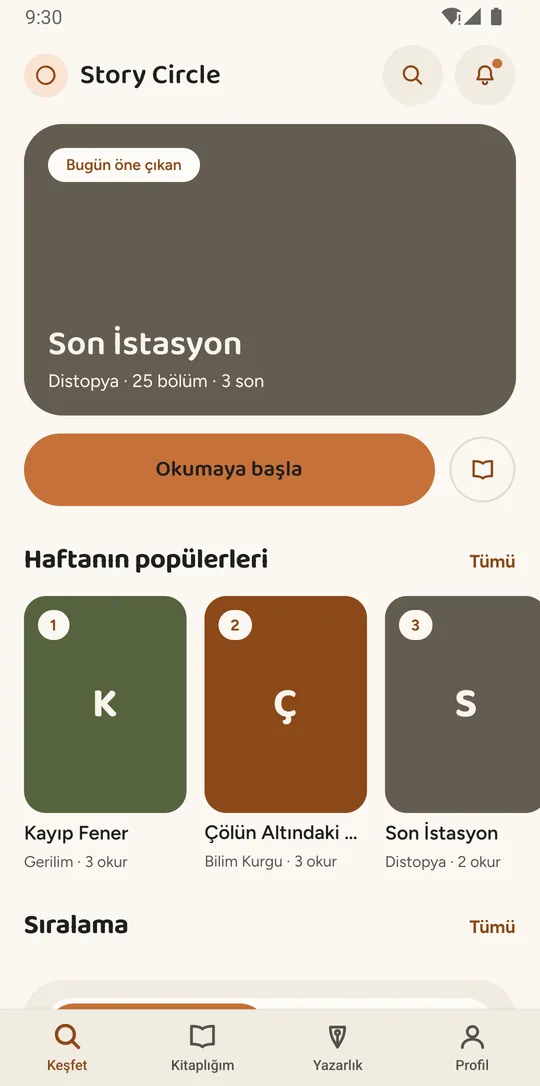
The large card at the top is the book of the day: a “Bugün öne çıkan” (Featured today) chip, the title, and three facts on one line — “Distopya · 25 bölüm · 3 son”: dystopia, 25 chapters, 3 endings. The third is particular to Story Circle: three separate endings have been written for this book. A branching story does not stop in one place; each path arrives at its own ending. A “Okumaya başla” (Start reading) button sits right under the card.
Below it is “Haftanın popülerleri” (Popular this week): numbered covers, each with its genre and the number of people reading it (“3 okur”: 3 readers). The “Sıralama” (Rankings) list of books starts under that. The magnifier at the top searches by title, author and tag; the bell opens notifications, and the dot on it means something is unread.
The four tabs along the bottom are the main parts of the app: Keşfet (Discover), Kitaplığım (My library), Yazarlık (Writing) and Profil (Profile). The other five screens in this tour all live inside those four.
Where it leads: tapping a cover opens that book’s page — the next stop on the tour.
What does the book page show?
The book page shows what to know before joining a book: who started it, how many authors have written, how many chapters are still open and who may write.
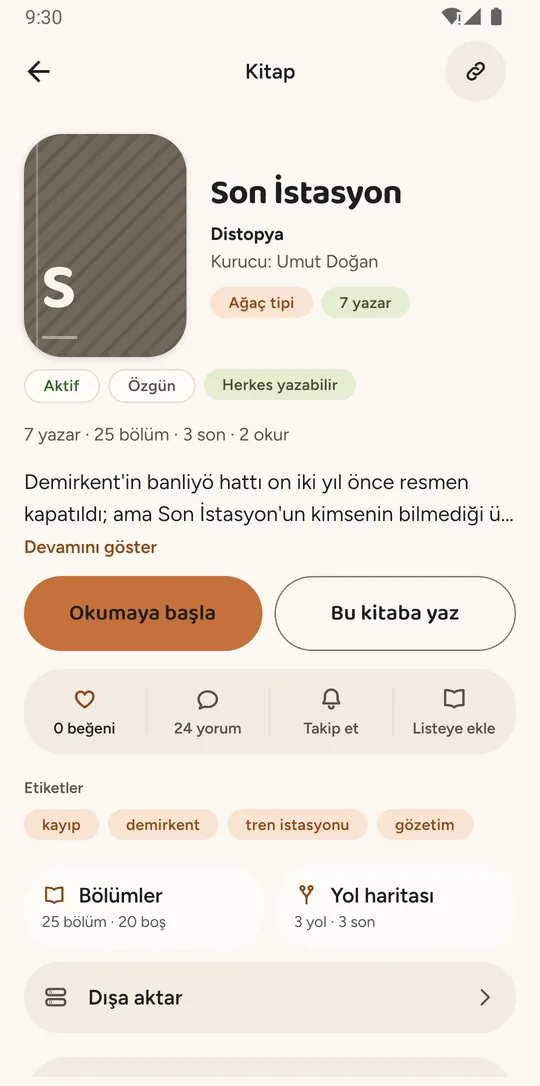
Under the title sit the genre and the founder (“Kurucu: Umut Doğan” — the person who opened the book and wrote its first chapter). The two rows of chips below carry what you need to know before going in. “Ağaç tipi” (Tree type) says the chapters do not run in a single line: more than one continuation can be written under one chapter. “7 yazar” is how many people have written a chapter in it so far. “Aktif” (Active) means the book is open for writing — not paused, not finished. “Özgün” (Original) means it is the authors’ own world; for fan fiction, the name of the source work would appear in the same place. “Herkes yazabilir” (Anyone can write) means writing in it needs nobody’s approval.
The line under the chips gives the book’s position at a glance: “7 yazar · 25 bölüm · 3 son · 2 okur” — 7 authors, 25 chapters, 3 endings, 2 readers. The description is cut short, with “Devamını göster” (Show more) to open it. Then come two buttons: “Okumaya başla” (Start reading) and “Bu kitaba yaz” (Write in this book).
The lower half of the page is every way into the book: like and comment counts, following, adding to a list, the tags, two tiles — “Bölümler — 25 bölüm · 20 boş” (chapters: 25 written, 20 open) and “Yol haritası — 3 yol · 3 son” (Path map: 3 paths, 3 endings) — and a “Dışa aktar” (Export) row for getting the book as an EPUB or PDF file. The number that says the most here is “20 boş”: twenty chapters in this book are still open for someone to write.
Settings such as the tree type, the target chapter count and who may write are chosen by whoever sets up the book; how to start writing a book walks through those choices one by one.
Where it leads: “Okumaya başla” to the reading screen, “Yol haritası” to the story’s tree, and those twenty open chapters to the Writing tab.
How does the reading screen work?
The reading screen runs chapters together: scrolling down brings the next one, scrolling up the previous one, and each chapter opens with the name of its author.
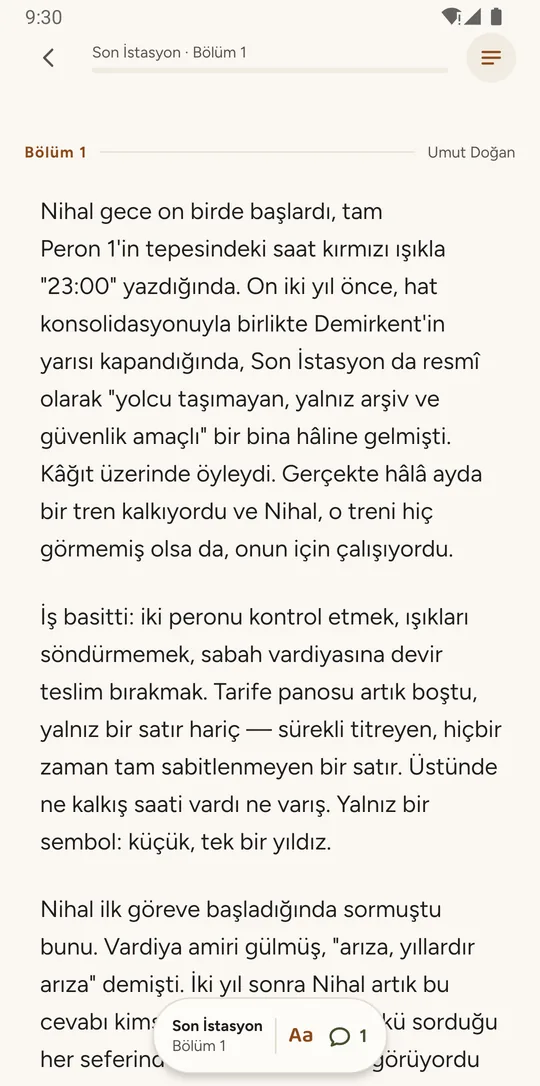
The header is deliberately thin: which chapter of which book you are in (“Son İstasyon · Bölüm 1” — chapter 1), a line under it showing how much of the chapter you have read, and a button on the right that opens the chapter list. Above the text sits the chapter number and, right-aligned, the name of the person who wrote it — here “Umut Doğan”. That name changes from chapter to chapter; no single person is writing this book.
The small bar floating at the bottom carries three things: where you are, “Aa” for text size, and a comment count — a “1” here, meaning one comment has been written on this chapter. The count belongs to the chapter, not the book, which is why it reads 1 while the book page said “24 yorum” (24 comments). Comments stay with the chapter being read, so what is said later in the book does not spill backwards.
Reading does not stop at the end of a chapter. Scrolling down brings the next one into the same flow and scrolling up brings the previous one back. In a branching book the flow ends in a choice — which of the continuations under this chapter you read next — and the route you take becomes your own path through the book. This is what reading interactive fiction looks like on Story Circle: the options were written by different authors, not by one.
Where it leads: if you would rather see the shape of the story before choosing, the path map takes the wider view.
What does the path map tell you?
The path map shows the shape of a branching book: how long the main path is, how many alternative paths and endings exist, and how many branches are still waiting to be written.
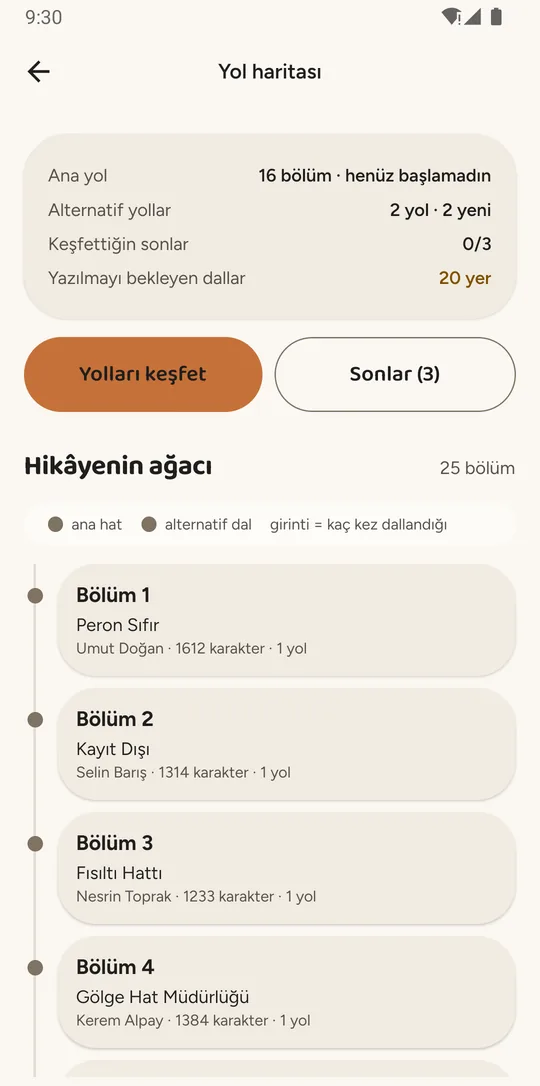
The panel at the top is four lines, and all four are numbers. “Ana yol — 16 bölüm · henüz başlamadın” (Main path — 16 chapters · not started): the main path is 16 chapters long and you have not started this book. “Alternatif yollar — 2 yol · 2 yeni” (Alternative paths — 2 paths · 2 new): two paths exist beside the main one and you have read neither. “Keşfettiğin sonlar — 0/3” (Endings found — 0/3): you have reached none of the three endings. “Yazılmayı bekleyen dallar — 20 yer” (Branches waiting to be written — 20) is highlighted, because that is the number a writer came for.
One pair of numbers on this screen says a great deal on its own: 25 chapters have been written, but the main path is 16 chapters long. The other nine sit on branches — the story divides at some point and the continuations off the main path have been written too. In a branching book, how many chapters exist and how many you read are not the same number.
Below, “Hikâyenin ağacı” (The story’s tree) is listed chapter by chapter: the number, the title, the author, the length (“1612 karakter”: 1,612 characters) and how many paths run through it (“1 yol”: 1 path). The color of the dot on the left says whether the chapter sits on the main path or on a branch; the indent says how many times the story has branched to get there. How to write a branching story explains how a tree like this is planned.
Where it leads: “Yolları keşfet” (Explore paths) goes back to reading, and “Sonlar (3)” (Endings (3)) lists the endings written so far. For someone who writes, the “20 yer” line is the open chapters list seen from the reader’s side.
How do you start writing from the open chapters list?
The open chapters list is where writing starts: open chapters from every book you may write in sit side by side, and each one is written by whoever starts it first.
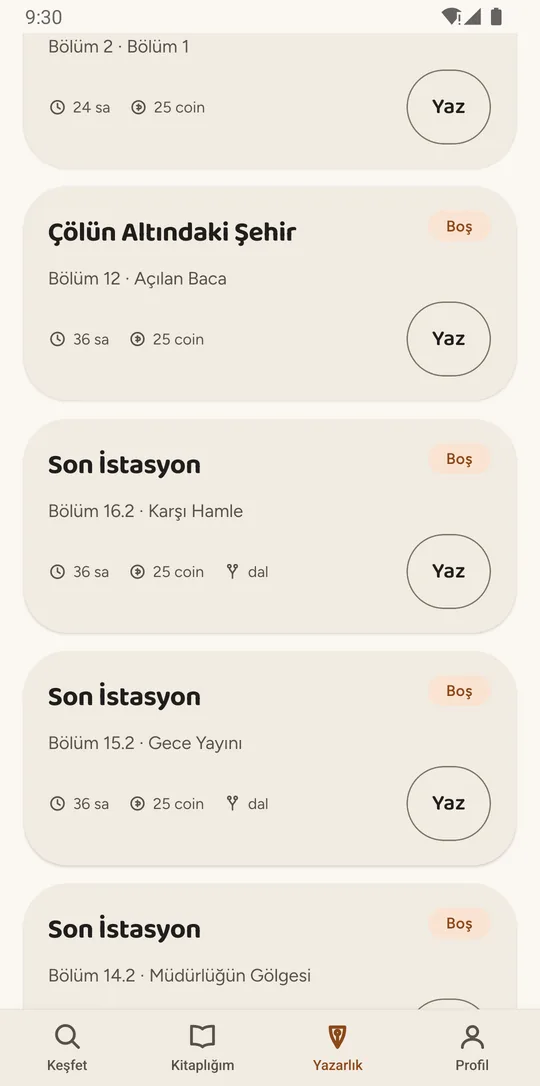
This list does not belong to one book. It puts the open chapters from every book you may write in side by side — in the capture, the first full card comes from “Çölün Altındaki Şehir” and the three below it from “Son İstasyon”. Each card gives the book’s title, a “Boş” (empty) chip on the right, and two pieces of information below: “Bölüm 16.2 · Karşı Hamle” — chapter 16.2 is the one to be written, and it continues the chapter titled “Karşı Hamle”. The dotted number marks a branch: 16 is where the chapter sits in the story, and 2 says it is the second continuation written under that same chapter.
The marks along the bottom of the card are enough to decide on. “36 sa” (36 h) is how long you have to finish the chapter once you start writing; the book owner picks this between 1 and 72 hours when setting up the book. The capture shows “25 coin” where the publishing reward sits: the currency was named Story Coin after this capture, and the amount now reads in SC. SC only exists inside the app and can’t be bought. “dal” (branch) marks an open chapter that continues a branch rather than the main path. The “Yaz” (Write) button starts writing.
The moment someone starts writing, the card drops off this list: two people cannot write the same chapter at once, so it is not taken from you mid-sentence. If your writing time is up, the chapter returns to the list and what you wrote stays with you as a draft; if the chapter is still open, you can carry on from that draft. If the book owner has turned on the consecutive-author rule, you can start the open chapter directly under one of your own only after a waiting period (6 hours by default), which gives others a chance to write that continuation.
Where it leads: “Yaz” opens the editor. A chapter you submit is published on its own once it passes the automatic content review; if the book owner has chosen to see submissions first, it goes to them and is published anyway if they do not look within 24 hours. how Story Circle works covers the whole loop step by step.
What does My library keep?
My library keeps the books you are reading and where you stopped in each; the books you set up, the ones you follow and your drafts are here too.
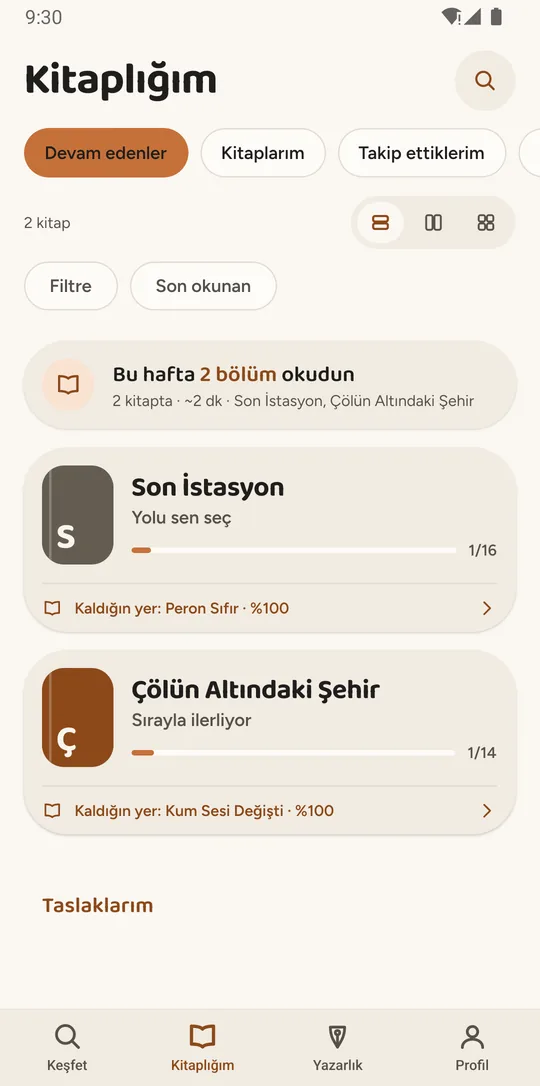
The tabs at the top separate different relationships with a book: “Devam edenler” (Continue reading) are the ones you have started, “Kitaplarım” (My books) the ones you set up, and “Takip ettiklerim” (Following) the ones you want to hear about when a new chapter appears. The card under them is the week’s summary: “Bu hafta 2 bölüm okudun” — you read 2 chapters this week, across 2 books, about 2 minutes in total.
Each row gives the book’s title and, under it, how the book moves: “Yolu sen seç” (You choose the path) is a branching book, “Sırayla ilerliyor” (Written in order) a single-line one. The “1/16” to the right of the bar counts the chapters on your path — in a branching book that is not the book’s total but the length of the path you are following, the same 16 as on the path map.
The line below names where you stopped: “Kaldığın yer: Peron Sıfır · %100” — you stopped in the chapter “Peron Sıfır”, a hundred percent of the way through, which means you finished it and the next one is waiting. At the bottom sits “Taslaklarım” (My drafts): chapters you started writing and have not finished, kept beside the books you are reading.
Where it leads: tapping a row opens the reading screen where you left off. The tour is back where it started.
Questions about the screenshots
What languages is the Story Circle app in?
English and Turkish. You can pick the language under Profile → Settings → Language; with “Device language” selected, the app follows your phone, and the language you choose is used for notifications too. The screenshots on this page were taken with the Turkish interface.
Are these screenshots real?
Yes. Every one is a capture from the running app, not a drawing or a design mock-up. They were taken in a development build running sample data, so the layout and the information on them are the app’s own.
Are the books and the author names real?
No. “Son İstasyon”, “Çölün Altındaki Şehir” and “Kayıp Fener” are sample books written during development, and names such as “Umut Doğan” and “Selin Barış” are invented. No real user’s book appears in the captures.
Why are the numbers on the screens so small?
Because they come from a test database: a handful of sample books and a handful of sample accounts. The reader, like and comment counts are calculated from those, so they say nothing about how busy the app will be.
Where can I download Story Circle?
Story Circle is in closed testing on Google Play, and joining the closed test is by invitation. The public Android release comes to Google Play on November 1, 2026. There is no iOS version.
Will these screens change?
They will. The captures are from September 4, 2026, and some details have changed since: the reward that shows as “coin” is now written as SC, short for Story Coin. When a screen changes noticeably, we replace its image.
Is the app just these six screens?
No. This tour follows the main line of reading and writing. The editor, the submission status, the steps for setting up a book, notifications, export and the owner panel are not on this page. Surfaces such as teams, clubs, school groups, events and the writing assistant are switched off in the app today, so none of the captures show them.
If you want to use these images in an article or a review, the downloadable files and the rules for using them are in the Story Circle press kit.